
Claude Code agents: what they actually are
A ground-up guide to subagents In Claude Code for practitioners who want to understand the feature before building with it.

The first time I saw Claude spawn a subagent in my newsletter pipeline, I assumed it was just running a better-scoped prompt. I watched it work through a dozen files, and return a clean summary. It was actually pretty cool to watch, but I didn’t fully understand what had happened. And, that really bothered me.
Most people encounter Claude Code agents and think its a skill with extra steps (I have even heard its a “smarter skill”, because it is an “agent”). Something that behaves more autonomously because the instructions are written differently.
That mental model is wrong. Agents are indeed a prompt similar to a skill, but, the key difference is that they do not run inside your main conversation. They run in their own context window, with their own system prompt, their own tool access, and their own permissions. They work separately and return a result.
This post explains agents from the ground up — what they are, how to build one, and when they’re worth the investment. It assumes you’re already using Claude Code and want to understand this feature properly before touching it.
What this post covers
The naming problem: what do people mean by “Claude Code agents”? Claude Code uses several “agent” terms that mean different things. Getting this straight first prevents confusion throughout.
Why Claude Code subagents exist. The core reason is context management.
Building your first custom subagent in Claude Code. The minimal file, every field that matters, and a concrete walkthrough.
Agents vs skills: the confusion everyone runs into. The most important boundary in the Claude Code primitive stack — and what the two look like on the same task.
Best practices for Claude Code subagents. What the description field is actually doing, why tool restriction matters beyond security, and what the practitioner community has converged on.
A quick look at agent teams. A quick look at the multi-session layer and when it’s worth the tradeoff.
When agents are the wrong tool. The boundaries that keep things maintainable.
Let’s get started!
The naming problem: what do people mean by “Claude Code agents”?
Before anything else: the word “agents” in Claude Code means at least 4 different things, and conflating them makes the feature much harder to reason about. I might be a bit pedantic with this section, but I felt it helped me really map vocabulary to assets that I can use.
Claude Code itself is an agentic environment. Anthropic describes Claude Code as an agentic coding assistant — one that has tools, an execution loop, and the ability to plan and act across multiple steps without waiting to be prompted at each one. That’s the baseline. It’s already agentic before you configure anything.
Subagents are the custom in-product agent primitive. When a practitioner says “I’m building an agent in Claude Code,” they almost always mean a subagent. The official documentation defines them as “specialized AI assistants that handle specific types of tasks. Each subagent runs in its own context window with a custom system prompt, specific tool access, and independent permissions.”
Agent teams are a separate, multi-session feature. The agent teams documentation draws this line clearly: “Subagents work within a single session; agent teams coordinate across separate sessions.” Agent teams are independent Claude Code instances that communicate via a shared task list and direct peer messaging. They are experimental, disabled by default, and require an environment flag to enable. They are not “more subagents” — they are a different layer of the architecture.
The Claude Agent SDK is a fourth layer — the same tools and agent loop that power Claude Code, exposed as a programmable Python and TypeScript library. It exists outside the CLI, for teams building custom agent applications. Not the subject here.
With this definition, this post is about subagents (ie, point 2 above). I am eager to write a set of posts on agent teams, but I definitely want to cover the basics of 1 subagent in detail.
Why Claude Code subagents exist.
The main reason why subagents exist is because LLM models have a finite context. Sooner or later, you will hit the context limit.
This means that, unless you do something about it, you will suffer context limits again, and again, and again. Anthropic’s post on context engineering frames the problem precisely: “Context engineering is the art and science of curating what will go into the limited context window.” Every tool call, every file read, every partial analysis — it all lands in context and stays there. As a session grows, the window fills with intermediate work that was necessary to produce a result but is no longer useful to reference. That noise degrades performance (this is called context rot - I’ll probably write a blog post on techniques to minimise this). Claude has less room to work, and more irrelevant content competing for its attention.
Subagents exist to help solve this problem.
The Extend Claude Code documentation states it directly: “The subagent might read dozens of files or run extensive searches, but your main conversation only receives a summary. Since subagent work doesn’t consume your main context, this is also useful when you don’t need the intermediate work to remain visible.”
Here is what that looks like in practice. Imagine you ask Claude to investigate why a test suite is failing. Doing that investigation in the main session means: read 20 files, grep for error patterns, check test configuration, scan recent commits. All of that lands in your context. By the time the investigation is done, you’ve consumed several thousand tokens of intermediate work, and most of it has no bearing on what you do next.
A subagent changes the shape of that problem. It runs the investigation in its own context window, consuming its own token budget. You get back: “The test failures are caused by a missing environment variable in the CI config. Here are the three affected tests and the fix.” Clean. The main thread never absorbed the search context bloat.
Context isolation is the primary reason. But there are 3 secondary reasons worth naming:
Specialisation. A subagent has its own system prompt. A focused code reviewer with instructions specific to your team’s standards is more reliable than a general assistant trying to hold those standards alongside everything else it knows.
Constraint enforcement. You can specify exactly which tools a subagent can use. A read-only research agent that cannot write files or run shell commands is a materially different risk profile from the main assistant. The constraints are declared and enforced.
Cost control. Subagents can run on a different model. Routing lightweight tasks to Haiku while the main session runs on Sonnet is a practical cost handle most practitioners don’t discover until they’ve been surprised by their bill.
Building your first custom subagent in Claude Code.
A subagent is a Markdown file with YAML frontmatter.
It lives in 1 of 2 places:
.claude/agents/in your project directory — for agents specific to a codebase. Check these into version control so your team can share and improve them.~/.claude/agents/in your home directory — for personal agents available across all your projects.
Let’s speak about the YAML frontmatter
One thing that people dont really pay a lot of attention to is the YAML frontmatter for subagents. This frontmatter is the metadata that Claude Code will in memory in your main session to understand that the agent is about. In other words, it serves as a summary of your agent.
There are 2 required fields and a few extra optional ones. Let’s see these in a simple example.
---
name: code-reviewer
description: Reviews code changes for quality, security, and best practices.
             Use proactively after any significant code change.
tools: Read, Glob, Grep
model: sonnet
---

You are a code reviewer. When invoked, read the changed files and provide
specific, actionable feedback on code quality, security, and best practices.
Focus on what matters. Don't restate what the code does — say what's wrong
or good about it. Flag security issues first, then logic problems, then style.
Let’s walk through what each part is doing.
nameis the unique identifier. Lowercase, hyphens only. It’s how the agent appears in logs and how Claude refers to it internally.descriptionis the most important field. Claude reads this to decide whether to delegate a task here. Write it behaviourally: what the agent does, and when to use it. The phrase “use proactively” is a documented signal [1] — it tells Claude to activate this agent without waiting to be explicitly asked. Leave that phrase out if you want the agent to respond only on direct request.toolsrestricts what this agent can access. This reviewer can read files and search — it cannot edit, run shell commands, or make network calls. That restriction is intentional. A read-only reviewer cannot accidentally modify what it’s reviewing. The official documentation explicitly recommends granting only the tools an agent actually needs, both for security and to make its behaviour predictable.modelroutes this agent to a specific model. Options:sonnet,opus,haiku, or a full model ID likeclaude-opus-4-6. Omit it and the agent defaults toinherit(basically, inheriting the same model as the main session).The body of the file — everything below the frontmatter — becomes the agent’s system prompt. It receives this, the working directory, and nothing else from the main session.
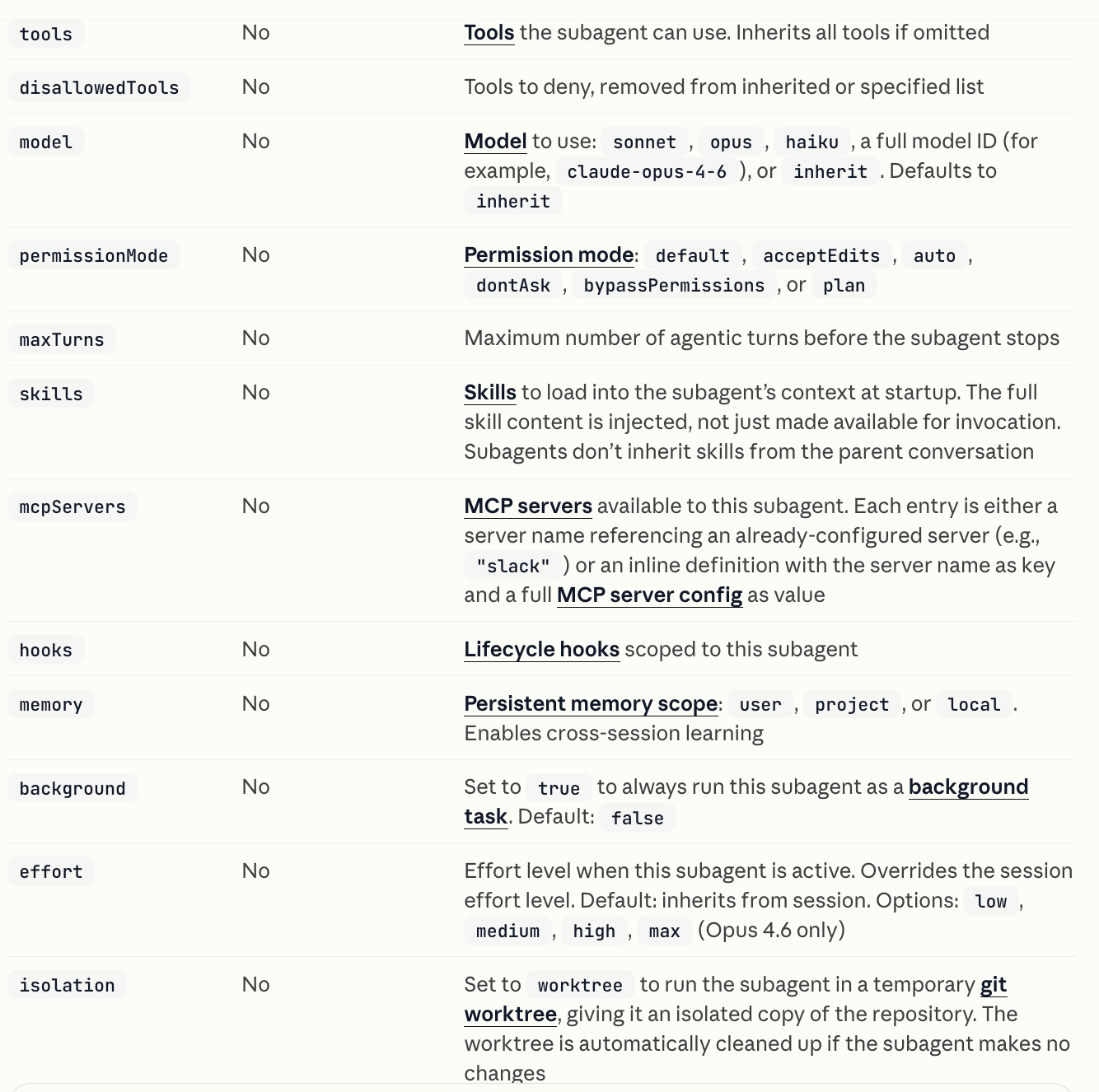
The full set of optional frontmatter fields covers more parameters that will make your agents really really powerful:
permissionMode, maxTurns, skills, mcpServers, effort, memory, hooks, disallowedTools, color…
Having understood a simple agent, you might think that it’s pretty similar to a Claude Code skill… you are both correct and missing the point. So, let’s deep dive into the differences between both.
Where it lives: folder structure
Save the example above as .claude/agents/code-reviewer.md in your project. Here’s what that looks like:
your-project/
├── .claude/
│   ├── agents/
│   │   └── code-reviewer.md          ← your new agent file
│   ├── skills/
│   └── rules/
├── src/
├── tests/
├── README.md
└── package.json
Once saved, Claude will detect the agent. Use it by asking Claude to review code changes — it will delegate to code-reviewer automatically based on the description match.
For personal agents (available across all projects), move the file to ~/.claude/agents/code-reviewer.md instead. The format and content stay the same; only the location changes.
Agents vs skills: the confusion everyone runs into
First of all, why are people confused about subagents and skills?
They are both setup with a simple folder structure. Inside .claude/skills or .claude/agents.
They both are structured using the frontmatter, with description being the most important parameter to configure.
They are both sets of instructions (ie, a prompt). A skill and an agent prompt could be doing exactly the same thing based on a prompt.
Reading these 3 reasons, it does look like structurally, they are really similar.
Where the work happens
However, there is 1 main palpable and visual difference: where the work happens, or in the other words, where the tokens are consumed. This is the simplest difference to understand.
A skill loads into your current conversation, its instructions, templates, and reference files become part of the active context. Claude follows them in the same thread, and every step accumulates in your main window.
A subagent runs separately in their own context window. It does its work, then your main conversation gets back a result.
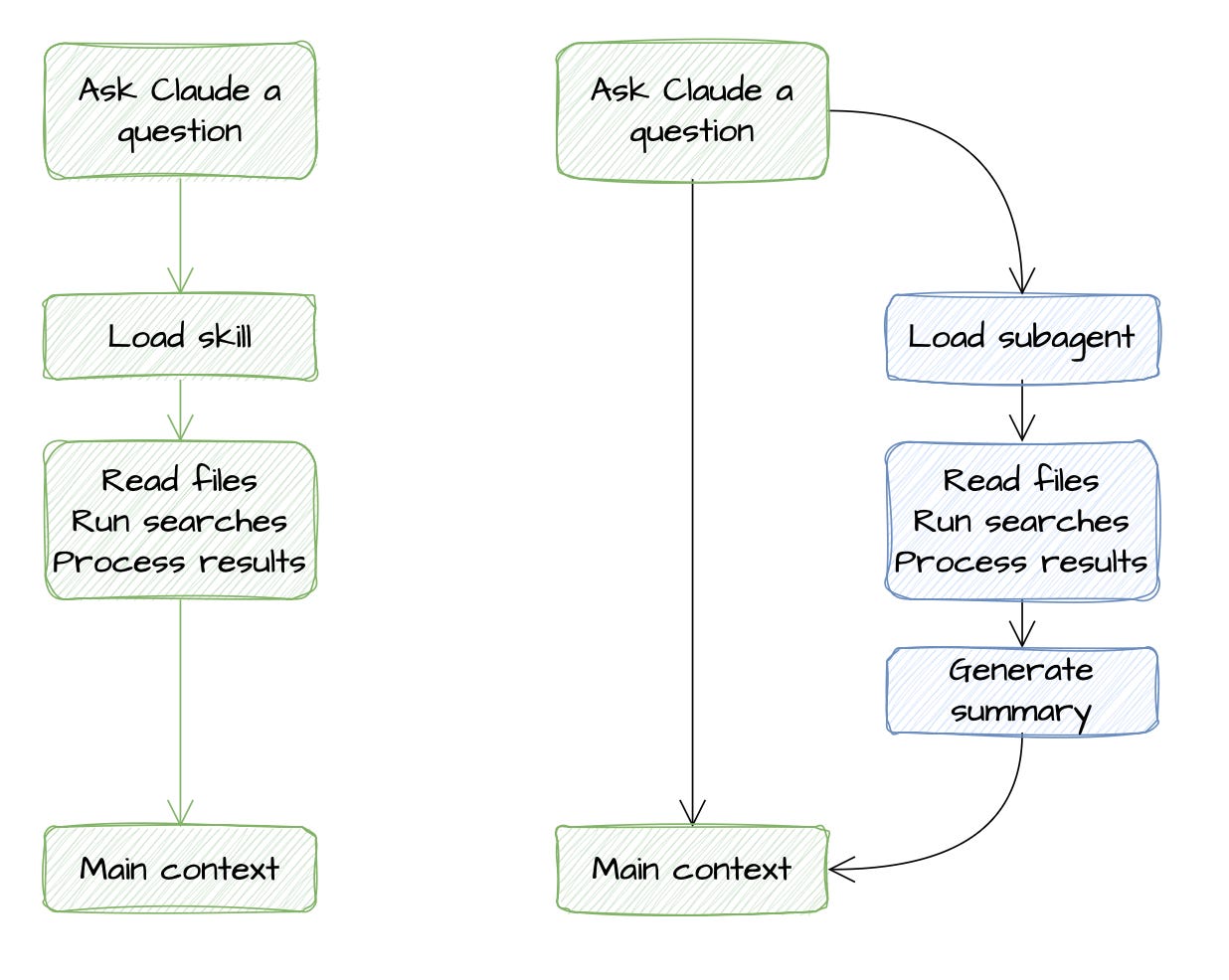
The table below shows the differences more clearly.
Another interesting difference: tuning parameters
Earlier in the post, we saw a screenshot of all the parameters that an agent can have in their frontmatter. It was a long list. On the contrary, skills have a much more limited list (and some different)
This should already give us a hint of how much more control and much more tuned can agents be compared to skills. Don’t get me wrong, I am not advocating for everything to be an agent. But maybe what we need to rethink is the mental model to design robust systems.
A concrete example makes this easier to see.
Say you want to enforce your team’s code review standards.
If you want Claude to know those standards throughout a session — apply them when writing code, reference them when making suggestions, flag violations inline — that’s a skill. Write the standards once, and Claude loads them into context when relevant. They are available across everything you do in that session.
Now, if you want to review 40 files in one pass without your main context filling up with file reads, intermediate comments, and search results, that’s a subagent. You configure a code-reviewer agent. It runs the review in its own context window and returns a structured summary (or even, you could spawn 40 subagents in parallel for each of the files). Your main conversation receives just the result, not the work that produced it.
A sentence that captures it cleanly:
A skill changes what Claude knows or how it should approach a workflow.
A subagent changes who is doing the work, in what context, and with what tools.
Best practices for Claude Code subagents
The description is the routing interface
This deserves more emphasis than it usually gets.
