
What the docs don't tell you about Claude Code skills
A practical guide to the anatomy, hidden levers, and design principles that make Claude Code skills reliable.

This month, I finished building a skill for every stage of my newsletter writing pipeline.
The process was straightforward, because everyone just told me: “hey, its easy, a skill is just a well defined markdown file”.
Now, Anthropic docs tell you how to create a skill. They also cover some good practices, but those are scattered across the official spec, production examples. Most importantly, it’s only after a fair amount of direct observation where you start to understand if the skill is doing its job or not.
So, what I wanted to share with you is that skills are a design pattern, not just a feature. Most practitioners treat them as markdown files with instructions. That is half right (great for PoCs) but you can enhance them much more for production grade systems, where reliability is key..
This post assumes you have already encountered Claude Code skills and want to go deeper. I will not walk you through creating your first skill. I will cover what the docs underexplain, and what I have found that actually makes skills reliable.
What this blog will cover
Claude skills in under 1 minute. A quick check on what they are and what problem they solve.
The mental model most practitioners are missing. Why a skill is not just instructions, and what actually happens under the hood.
The full anatomy of a skill. SKILL.md, frontmatter, and the directories that make the system work.
The hidden levers behind reliable skills. The small design decisions that determine whether a skill works consistently or fails silently.
Advanced tricks that unlock real power. Mixing scripts with reasoning, designing for composability, and controlling model behaviour.
How skills fit into the wider system. Where they sit relative to MCP, subagents, and agentic workflows.
When skills are the wrong tool. The boundaries that keep your system simple and maintainable.
Practical design principles. How to structure, test, and iterate on skills as if they were software.
Let’s get started!
Claude skills in under 1 minute: what are skills?
A Claude skill is a reusable package of instructions, resources, and optional code that teaches Claude how to perform a specific task reliably (well, reliably depends really on how you define this skill, and that’s what we will cover in this post).
Unlike a prompt, which lives in a single conversation, a skill persists across sessions and can be selected automatically when relevant. It is not just something Claude reads, it is something Claude can decide to use.
At a glance, a skill looks simple: a markdown file with some instructions. And for small use cases, that is often enough. Simple right?
The mental model most people miss
Well, of course it is simple if you scratch the surface of skills. As mentioned above, most practitioners mentally model a skill as: a markdown file, instructions at the top, maybe some examples. Claude reads it, follows it, done. Something like this:
---
name: summarise-meeting-notes
description: Summarises raw meeting notes into a short structured recap. Use when the user provides messy notes and wants clear next steps.
---

## Instructions
- Read the notes carefully.
- Extract the main decisions, open questions, and action items.
- Return the output under these headings:
  - Summary
  - Decisions
  - Action items
That is the version most people carry around in their heads: a skill is basically a markdown prompt with a name attached. Now, this of course works. And it great for PoCs.
But that mental model breaks down quickly as soon as you try to make skills reliable at scale. This is why skills are better understood as a design pattern, not just a feature. The Agent Skills Overview in the Claude API docs however, describes something more precise: a 3-layer architecture where different parts of a skill load at different times, at different costs.
Metadata (a.k.a. Frontmatter fields) — always loaded at startup. Claude reads this first, for every available skill, in order to decide what might be relevant. This is why the description is SO important for skills (more on that later).
Instructions — This is the main body of
SKILL.md. It gets loaded when the skill is actually selected. This is where the workflow, steps, examples, and output expectations live.Resources — These are supporting files such as documents, templates, schemas, or scripts placed in directories like
references/,assets/, orscripts/. They are loaded only when needed during execution.
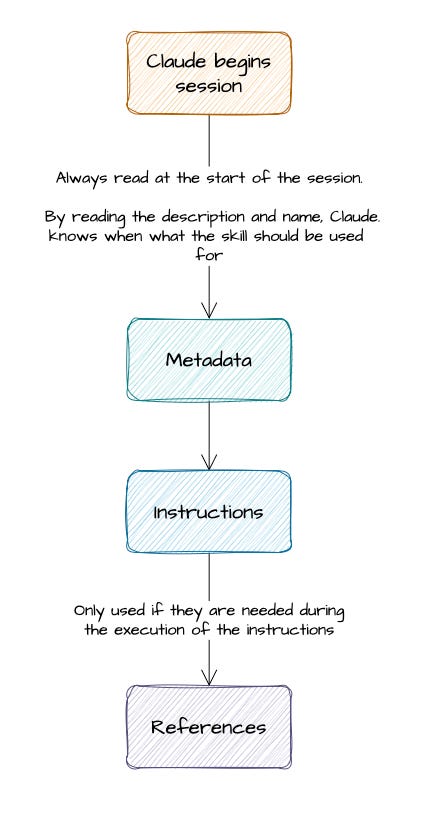
These are assets that, if you understand well, they can make skills take a massive leap of quality for your production systems. This is also why skills are better understood as a design pattern, not just a feature. Now that we have the mental model, we can look at the actual anatomy of a skill and see where each of those layers lives in practice.
The full anatomy of a skill
Now that the loading model is clear, we can look at the physical anatomy of a skill: what files it contains, what each part is responsible for, and how that structure supports the layered design we just covered. These are the elements we will cover:
The skills directory and the SKILL.md
The 3 optional folders you can use in a skill.
A deep dive into the fields that you can use in the Frontmatter fields
The skills directory and the SKILL.md
At the simplest level, a skill is just a directory with a required SKILL.md file inside it.
In Claude Code, skills typically live under the .claude/skills/ directory. Each skill gets its own folder, and the folder name becomes the skill’s identity on disk. Inside that folder, SKILL.md is the one file that must exist.
A minimal skill might look like this:
.claude/
└── skills/
    └── summarise-meeting-notes/
        └── SKILL.md. # Word of caution -> this has to be named EXACTLY SKILL.md
That alone is enough to create a working skill. But in practice, robust skills usually grow a bit more structure around that core.
The 3 optional folders you can use in a skill.
3 optional directories sit alongside SKILL.md:
scripts/— executable code. Shell scripts, Python files, anything the skill can invoke directly. This is where deterministic execution lives.references/— heavy context loaded selectively. Design specifications, lookup tables, large reference documents. These load on demand, not at activation.assets/— supporting files: templates, schemas, example outputs.
This means that a more complete skill might look like this:
.claude/
└── skills/
    └── newsletter-draft-review/
        ├── SKILL.md
        ├── scripts/
        │   └── validate_structure.py
        ├── references/
        │   └── style_guide.md
        └── assets/
            └── output_template.md
The SKILL.md file holds the metadata and main instructions. But the optional folders let you keep the skill lean by moving bulky or specialised material out of the main file and loading it only when needed. That matters because content placed in references/ does not have to be loaded every time the skill activates, whereas content stuffed into the body of SKILL.md does.
It’s worth paying a bit more attention to the references/ directory. It is where the three-layer architecture pays off in practice. Heavy content placed there loads only when the skill needs it during execution. The same content placed in the SKILL.md body loads at every activation. That distinction has a real token cost, and across a system of many skills it compounds.
The practical guideline from the Anthropic best practices documentation: keep SKILL.md under 500 lines. Treat that as a structural target. When a skill body exceeds it, the question is not “how do I make the prose tighter” — it is “what belongs in references/?”
A deep dive into the fields that you can use in the Frontmatter fields
Inside SKILL.md itself, the top section is the frontmatter: a small YAML block that describes the skill. The Frontmatter fields are nothing more than specs which describe the skill.
Now, you can’t add anything you want in the specs, this section needs an actual format or schema. As of time of writing, these are some of the fields you can work with. The 2 most important ones are name & description.
(required)
name. Lowercase, hyphenated, and concise.(required)
description. Explains what the skill does and when it should be used.(optional)
license. A licence name or reference to a bundled licence file.(optional)
compatibility. Environment requirements such as product target, system packages, or network assumptions.(optional)
metadata. Extra key-value information such as owner, version, or internal tags.
You can extend these optional descriptor fields with a whole load of parameters that control the skills.
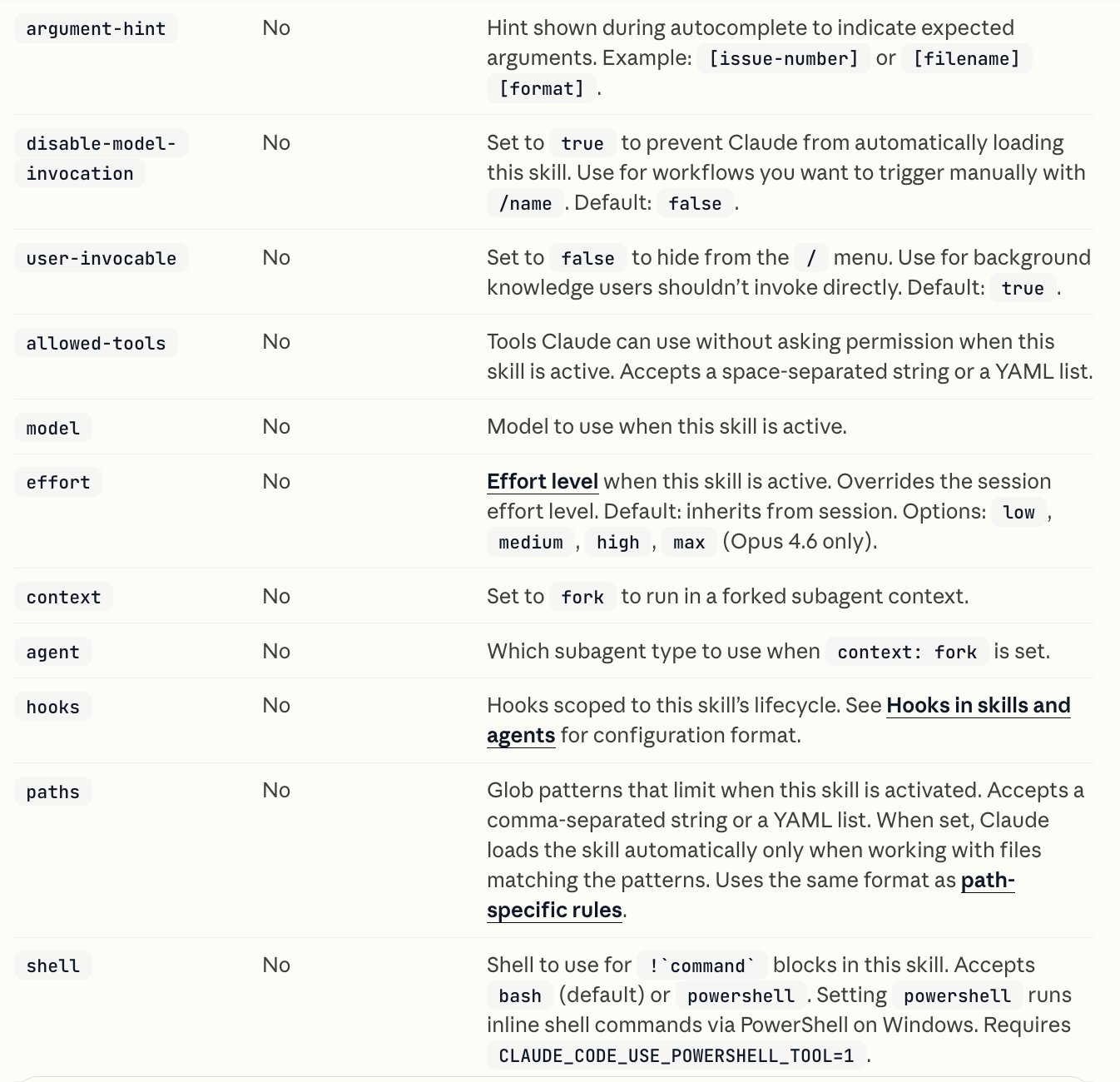
Here is a possible example.
---
name: newsletter-draft-review
description: Reviews a newsletter draft for structure, clarity, and section flow. Use when the primary input is a draft article and the goal is editorial improvement rather than full rewriting.
license: Apache-2.0
compatibility: "Claude Code; requires Python 3.11+ for local validation script"
metadata:
  author: jose-parreno-garcia
  version: "1.2"
  team: senior-data-science-lead
allowed-tools: Read Write Bash(python:*)
---
The power of arguments in a skill
As Data Scientists or Software Engineers, we are very used to passing variables around functions. Skills have a similar concept, where string substitution or injection is allowed so that we can make the skill receive dynamic values.
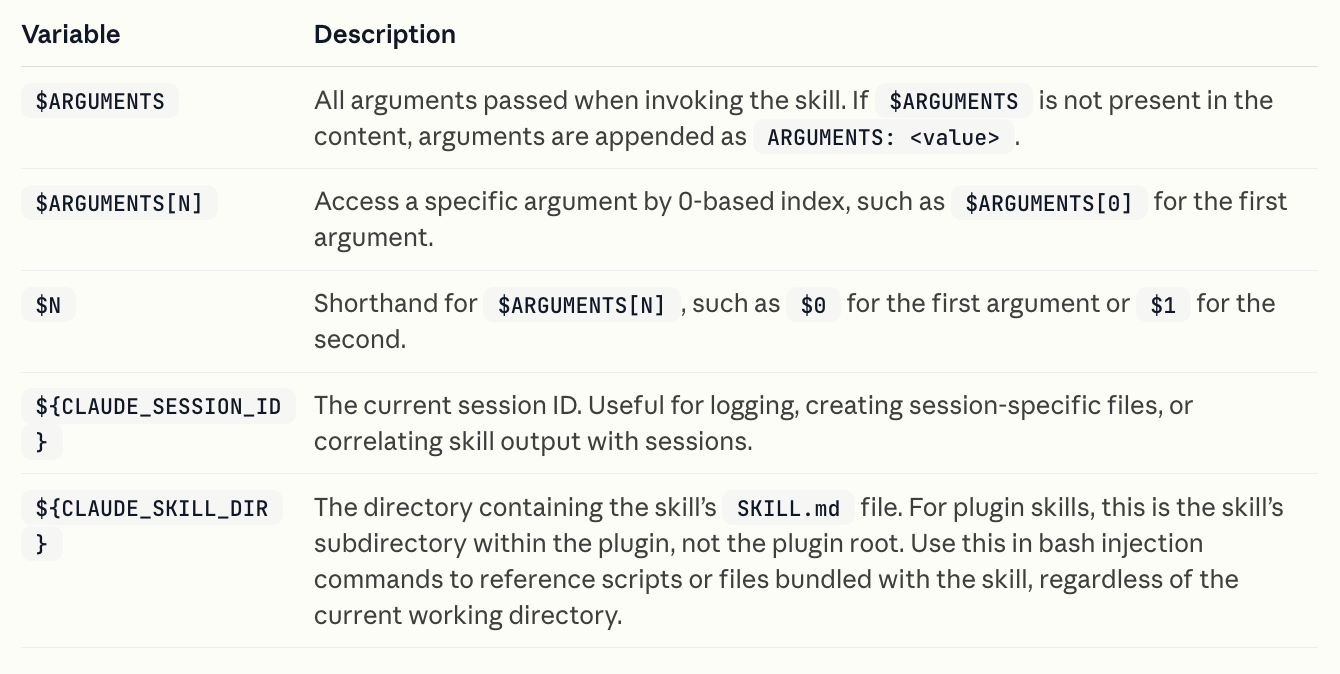
Here is an example:
---
name: session-logger
description: Log activity for this session
---

Log the following to logs/${CLAUDE_SESSION_ID}.log:

$ARGUMENTS
This session-logger can help you understand what arguments you have been inadvertently been passing around. With that, you can start then working with the argument-hint parameter that was mentioned in the optinal frontmatter fields.
An example of how Anthropic themselves use skills.
As you can see, skills can be way more powerful than 1 simple script with markdown instructions. In fact, these same features are what Anthropic themselves use.
In their skills repository, Anthropic has an incredible amount of examples that we can all learn from. Here are 2 to show you:
xlsx skill. 292 lines and worth reading in full. The description field is long and detailed — explicit triggers ("DO trigger when...") and explicit exclusions ("Do NOT trigger when..."). The body sets strict output standards: zero formula errors, professional formatting conventions throughout.
frontend-design skill. Full use of everything a skill can use. It has a
scripts/andreferences/directories. On top of that agents/ and many other directories. A really really complete skill.
These are not verbosity. It is precision engineering. So yes, learn from them.
The hidden levers that separate reliable skills from fragile ones.
Once you understand the anatomy of a skill, the next question is more interesting: which parts actually determine whether the skill behaves reliably in practice?
The description field selects the skill
The first, and most underestimated, is the description field.
